
List hygiene is the practice of checking and managing your contact list to ensure it includes only valid, active, and genuinely engaged subscribers. A well-maintained list plays a major role in deliverability. Mailbox providers are far more likely to place your messages in the inbox when your data is accurate, and much more likely to route them to spam when it isn’t.
However, list hygiene is not just for senders with "bad" habits. Even perfectly legitimate lists are outdated with time. According to the 2025 Email List Decay Report by ZeroBounce, email lists degrade by approximately 28% every year. People change jobs, abandon old AOL or Yahoo accounts, or simply stop checking an inbox. If you aren’t actively cleaning your data, nearly one-third of your legitimate leads become "toxic" annually.
Protecting your sender reputation depends heavily on keeping your email list clean and ensuring your emails don’t hit spam traps. We’ll explore spam traps in depth in this article, where you’ll learn why maintaining a high-quality list is so important.
The Consequences of Inaccurate Lists: Unknown Users and Spam Traps
To maintain a healthy list, there are certain types of email addresses you should always avoid.
The first group is unknown users. These are email addresses that were either never valid or have been abandoned. When you repeatedly send to unknown users, mailbox providers interpret it as a sign that you’re not taking care of your data, which harms your reputation.
It’s similar to delivering a package to an empty house when any observer would question what you’re doing. Mailbox providers think the same way when they see you emailing unknown email addresses.
The metric to watch here is your Hard Bounce Rate. Mailbox providers like Google and Yahoo expect this to remain under 0.5%.
More critically, as of 2024, Google and Yahoo strictly enforce a Spam Complaint Rate threshold of 0.3% (3 complaints per 1,000 emails). If your rate exceeds this, your domain faces an immediate risk of being blocked.
As soon as you see a 5xx bounce code (indicating the user does not exist), you must remove the address permanently. It’s recommended to keep your unknown user rate under 2% of your entire list.
Another category you must avoid is spam traps. These are email addresses that don’t belong to any real person and exist solely to identify senders with sloppy list practices or shady data collection.
How do these traps end up on your list? It rarely happens by accident.
- Harvesting and Scraping: Harvesting and scraping happen when bots scan websites for anything containing an “@” symbol to build email lists. Spam trap operators hide special trap addresses in website code(pristine traps) that are visible to bots but not people. When a sender later emails these hidden addresses, it signals that their list was gathered through improper or non-permission-based methods.
- Purchased Lists: When you buy a list, you are often buying data that has been resold multiple times. These lists are frequently seeded with traps to catch unauthorized usage.
- Co-registration errors: Sometimes, a trap enters a list through a partner network where data is shared without strict validation.
If you hit a spam trap, mailbox providers may assume you bought a list, scraped emails, or simply aren’t managing your data well. This can lead to your emails being placed in spam or blocked altogether, which damages your sending reputation.
Spam Traps
There are three main types of spam traps to be aware of: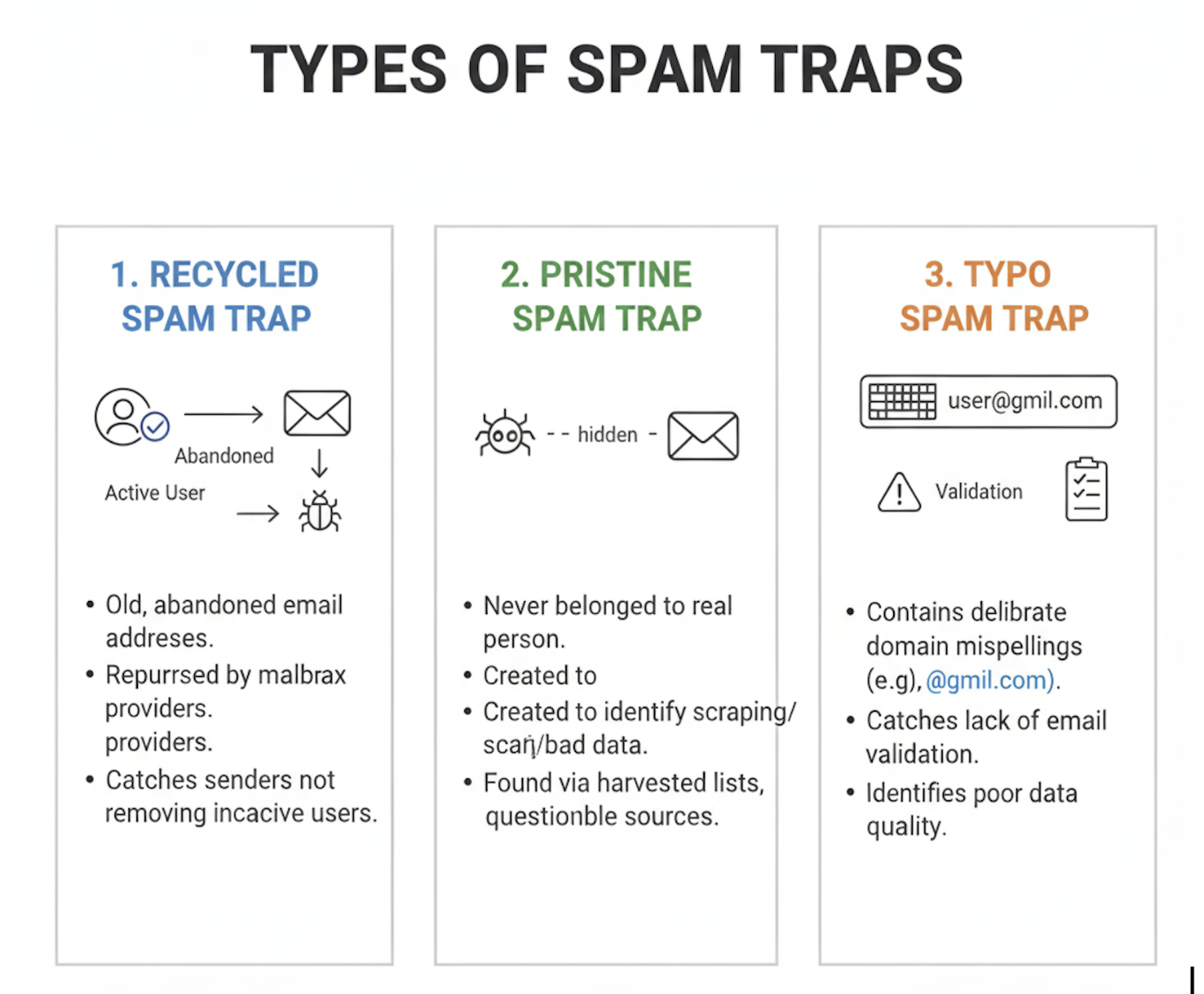
- Recycled spam traps: These once belonged to real users but were later abandoned. Mailbox providers repurpose them to catch senders who don’t remove inactive addresses.
- Pristine spam traps: These addresses were created solely as traps and have never been used by real people. They often show up when addresses are collected without permission or through questionable sources.
- Typo spam traps: These contain obvious domain misspellings (e.g., gmil.com instead of gmail.com) and are designed to catch senders who aren’t validating their signups or managing data quality.
The "Legitimate Business" Paradox: How Good Lists Get Spam Traps
A common misconception is that when a company doesn’t buy email lists, then there is no need to worry about spam traps. This is false. Legitimate businesses with 100% opt-in leads are frequently hit by Recycled Spam Traps and Typo Traps.
Here is how a legitimate business gets infected without ever buying data:
- The Typo Issue: According to 2025 data from TurboSMTP, approximately 15% of all email addresses entered into web forms contain typos (e.g., This email address is being protected from spambots. You need JavaScript enabled to view it. instead of gmail.com). If you do not use Double Opt-In (DOI) or real-time validation, you immediately ingest a typo trap into your database.
- The Dormant Account: A customer signs up in 2020. They stopped reading your emails in 2022. By 2024, the mailbox provider will shut down the account. In 2025, the provider reactivates that address as a Recycled Spam Trap to see if you are still emailing inactive users. If you keep emailing that old address because you aren't filtering by engagement, you hit the trap. You didn't buy the list; you just held onto it too long.
Why traps destroy domain reputation faster than IP reputation
It is important to understand that spam traps damage your domain reputation much faster and more severely than your IP reputation.
IP addresses can be rotated or changed. However, your domain is your digital identity. Modern spam filters rely heavily on domain reputation because it is harder to fake. When a pristine trap is hit, it signals a fundamental flaw in your data collection logic (i.e., the list was collected by harvesting or scraping, and you are emailing people who never signed up).
Mailbox providers view this as a willful violation of permission, causing them to penalize the domain itself. Once a domain is flagged for trap hits, simply switching IP addresses will not fix the delivery issue.
Analyzing Bounce Patterns and High-Risk Sources
Before you even hit a spam trap, your list often gives you warning signs through bounce pattern analysis. Think of these bounces as a weather app warning you of rain before you step outside.
A sudden spike in "Hard Bounces" (specifically 5xx error codes) is the primary red flag to spam trap hits. A hard bounce means the address is permanently invalid. If you are hitting a high number of invalid addresses, it is statistically certain that you are also hitting spam traps, as both reside in the same pools of bad data.
To prevent this, you must identify high-risk list sources by analyzing historical performance. But how do you actually check this history? It requires a process called “Lead Source Attribution”.
- Tagging and Segmentation: You cannot analyze what you do not track. Every contact entering your database should be tagged with their specific origin (e.g., "Webinar_Signup_Nov," "Partner_Lead_List_B," or "FB_Ads_Q4").
- Cohort Analysis: Do not just look at your list as a whole; look at it in batches (cohorts) based on those tags. For example, review the performance of "Partner_Lead_List" separately from your organic signups.
- Establishing Thresholds: Look at the historical data for each source. If a specific data source generates a hard bounce rate above 1-2%, it is a "High-Risk Source."
For example, if you analyze your logs and see that contacts acquired via "Contest Entry Forms" historically have a 10% bounce rate, while "Newsletter Signups" have a 0.5% bounce rate, the Contest source is polluted.
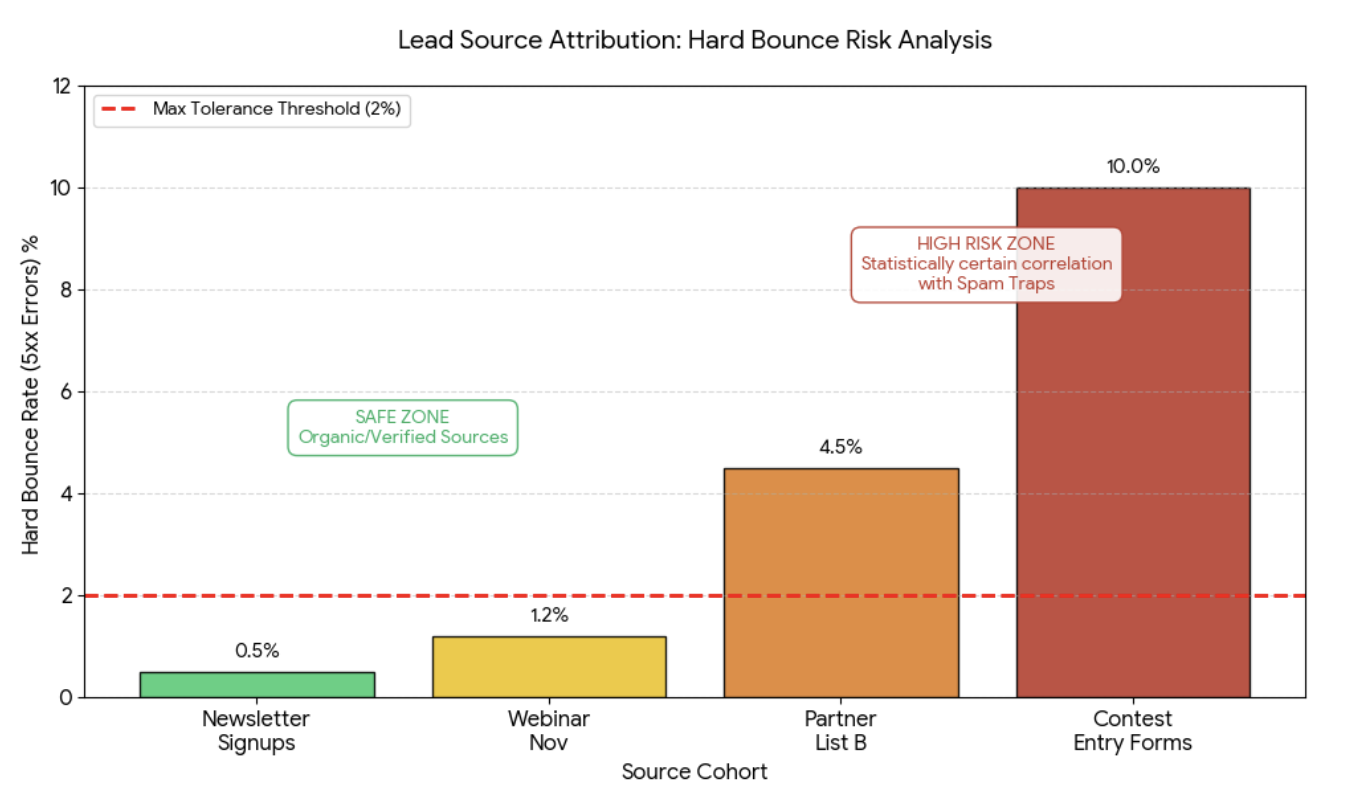
If you identify a source with a history of poor performance, you should immediately quarantine any new data coming from that source. Do not add them to your main mailing list until they have been verified or reconfirmed. By cutting off high-risk sources based on their track record, you stop spam traps from entering your ecosystem.
The Role of Engagement-Based Filtering
So, how do you keep bad data out of your list? One of the most important steps is following best practices based on your audience’s engagement patterns.
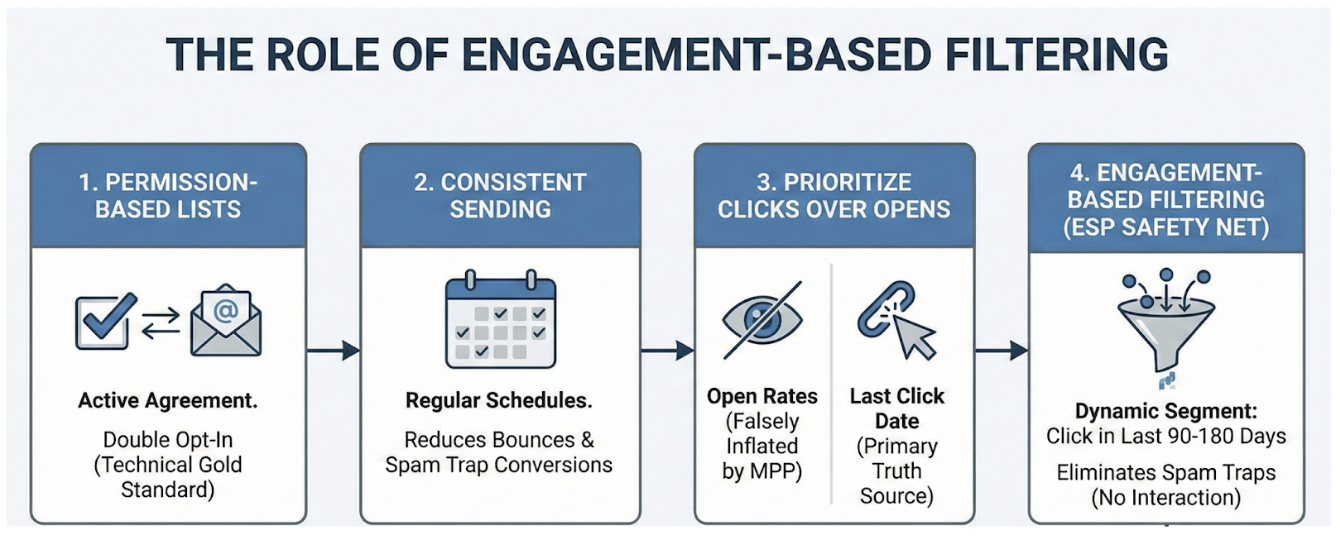
- Only send to permission-based lists. This means every contact has actively agreed to receive your emails (Double Opt-In is the technical gold standard here).
- Email your list consistently. Regular sending helps reduce bounces from unknown users and minimizes the chance that old addresses turn into spam traps.
- Prioritize Clicks over Opens. In an era of privacy protections like Apple’s Mail Privacy Protection (MPP), "Open Rates" can be falsely inflated by image-caching servers. For technical hygiene, rely on "Last Click Date" as your primary truth source.
This is where engagement-based filtering becomes your safety net. Unlike real humans, spam traps (especially pristine ones) are scripts. They do not interact with content. They don't browse websites, and they rarely click links. By configuring your ESP to send primary campaigns only to a dynamic segment of users who have clicked a link in the last 90 to 180 days, you statistically eliminate the vast majority of potential traps.
Frequency Decay and Inactivity Logic
Beyond simple filtering, you should implement an automated frequency decay (or throttling) system. It is technically risky to keep emailing a user at full volume if their engagement signals are fading. You should configure your automation logic as follows:
- Active Phase (0–30 days): The subscriber receives emails at full frequency (e.g., daily).
- Decay Phase (31–90 days): If no engagement is detected, the system automatically moves them to a "Decay Segment." Their frequency is throttled down (e.g., once a week).
- Dormant Phase (90+ days): If inactivity persists, they are moved to a "Re-engagement" workflow.
- Suppression: If the re-engagement campaign fails to generate a click, the system must trigger a "Hard Suppression."
This inactivity logic helps you gradually reduce sending to unengaged users, protecting your deliverability and overall sender reputation. By gradually withdrawing rather than stopping abruptly, you also protect your domain reputation from sudden volume spikes or drops.
Technical process of list cleaning, deduplication, and role account removal
Effective list hygiene involves a technical process that goes beyond just checking if an email exists:
- Deduplication: Ensure the same email address doesn't appear on your list multiple times. This prevents skewing your metrics and annoying subscribers.
- Role Account Removal: Addresses like admin@, support@, or sales@ are often shared inboxes. They rarely engage and are frequently converted into spam traps. It is best practice to remove these from marketing lists.
- Verification: Use an email verification service to check the accuracy of your list. These tools help identify invalid, risky, or inactive email addresses before they can affect your deliverability.
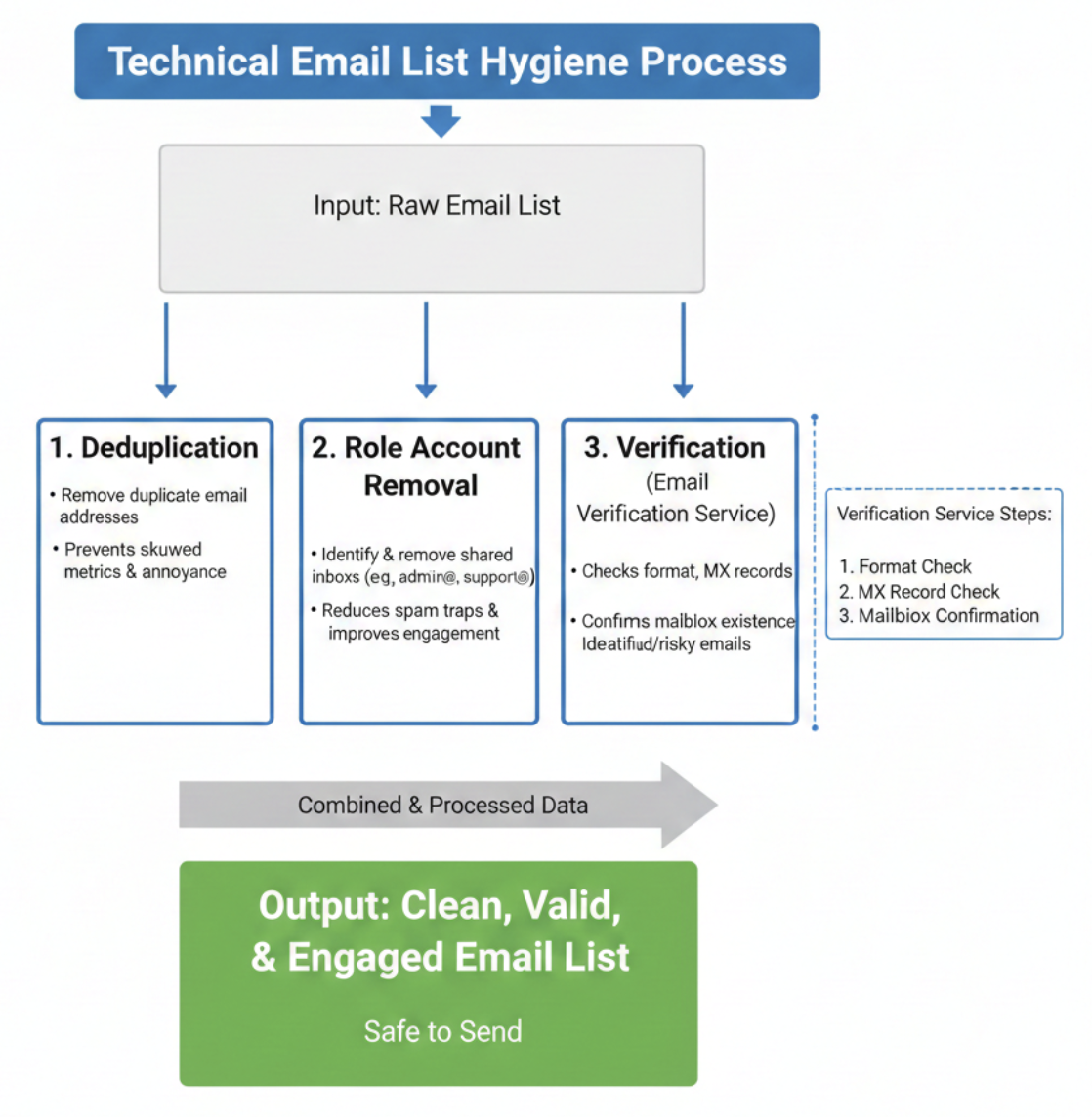
Tools like the ones mentioned above help you confirm which email addresses are safe to send to. Their verification process typically includes:
- Checking whether the email address is formatted correctly.
- Confirming that the domain can receive mail (via MX records).
- Communicating directly with mailbox providers using specialized integrations to confirm whether the mailbox actually exists.
Correct Revalidation Cycles and "Permission Refresh" Logic
Finally, list hygiene requires knowing when to say goodbye. It is important to distinguish between a standard "win-back" campaign and a "Permission Refresh."
If a subscriber has been inactive for a short period (e.g., 3–6 months), a win-back campaign with a discount or special offer is appropriate. However, if a subscriber has been inactive for a significant period (e.g., 12+ months), sending a standard marketing email is technically risky. In that time, the user may have abandoned the address, and it could have been converted into a recycled spam trap. In these high-risk cases, a "Permission Refresh" (or Permission Pass) is required.
This process is the final stage of what is technically known as the “Sunset Strategy”. While "Permission Refresh" is the specific tactic (checking for consent), the Sunset Strategy is the automated framework configured in your ESP that triggers these checks and schedules the final deletion of data.
The logic is strict:
- Isolate the Segment: Create a segment of users who have not engaged in over 12 months.
- Send a Plain-Text Request: Send a simple, non-promotional email asking, "Do you still want to receive these emails?" Provide a clear link to confirm subscription.
- The "Silence is a No" Rule: This is the most critical step. If the user does not click the confirmation link within a set window (e.g., 7 days), they are automatically removed.
Unlike standard marketing, where you keep people until they unsubscribe, a Permission Refresh requires an affirmative action to stay. This ensures your list hygiene correlates directly with stable inbox placement because you are only sending to people who effectively vote "yes" with their current engagement.
Conclusion
There are many ways an email list can be built, but not all are safe. For example, a marketer might assume that sending to a very large list is better and decide to purchase a massive database from an unreliable source, unaware that it could destroy their email performance.
Or, they might revisit an old list collected legitimately but never verified or cleaned for years. In both situations, the sender risks hitting spam traps, which guarantees poor deliverability.
Data decay is expensive. According to Gartner Data Quality Reports, poor data quality costs organizations an average of $15 million per year in lost revenue and wasted resources.
By verifying your contacts and removing invalid, inactive, or non-existent emails, you significantly improve your list quality and boost your overall deliverability.